Exporting & sharing
vMPT writes a self-contained bundle directory that captures
your full session. Same writer for Save session and
Export eMPT bundle; the only difference is where the files land.
Files written
The two APT-facing files are target-prefixed so it’s obvious which
file APT/MPT loads (<catalog_stem> is your loaded catalog’s name):
File |
Format |
Consumed by |
|---|---|---|
|
Text (tab-sep) |
APT Import MSA Source Catalog |
|
JSON |
APT MPT Import Plan(s) |
|
Markdown |
you — the import steps below, filled in for this bundle |
|
JSON |
vMPT-only (full state) |
|
Text |
eMPT pipeline |
|
Text |
eMPT pipeline |
|
CSV |
eMPT pipeline |
A multi-config plan also writes a config_N/ subfolder per pointing
with that config’s own eMPT products.
vMPT_workspace.json is the canonical save: every other file
can be regenerated from it. The recipient just needs to point
Load session at the workspace JSON (or the *_MPT_plan.json — the
sibling is auto-discovered).
.cat columns
# ID RA DEC Weight Primary [Magnitude] [Redshift] Label
Weight — APT’s ranking field. vMPT writes the source’s weight, falling back to its priority where no weight is set (APT’s MSA catalog format has a
Weightcolumn but noPrioritycolumn).Primary —
1= a source from your input catalog;0= a slitlet vMPT opened that had no catalog source (avMPT_synthrow).Magnitude / Redshift — carried from your input catalog when present (a missing value is written as
99.9mag /-1redshift, notNaN, which APT rejects); the columns are omitted entirely if your catalog has neither.Label — your original source ID / label, preserved for traceability.
Loading into APT / MPT
The bundle’s generated README.md spells these steps out with the exact
filenames for that run. The general flow:
Import the source catalog. In APT click Import MSA Source Catalog. Set File to Import to
<catalog_stem>_APT_catalog.cat, type the Catalog Name (use the.catstem — it matchescatalog.namein the plan), and set File Format to Whitespace Separated. Click Import.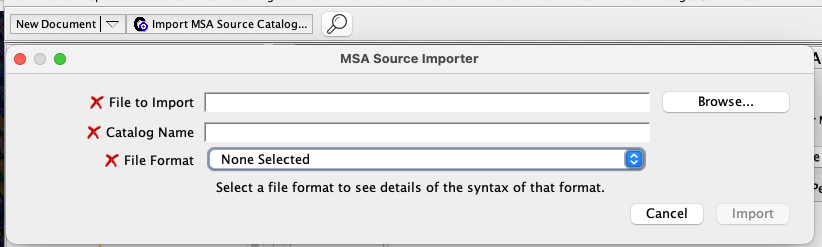
APT’s MSA Source Importer — set File Format to “Whitespace Separated” for a vMPT
<catalog>_APT_catalog.cat.Import the plan. Open the MSA Planning Tool → Plans tab and, in the Plan Selection box, click Import Plan(s) → choose
<catalog_stem>_MPT_plan.json. Each configuration loads as its own Pointings entry. With the plan selected, click Create Observation (or Update Observation).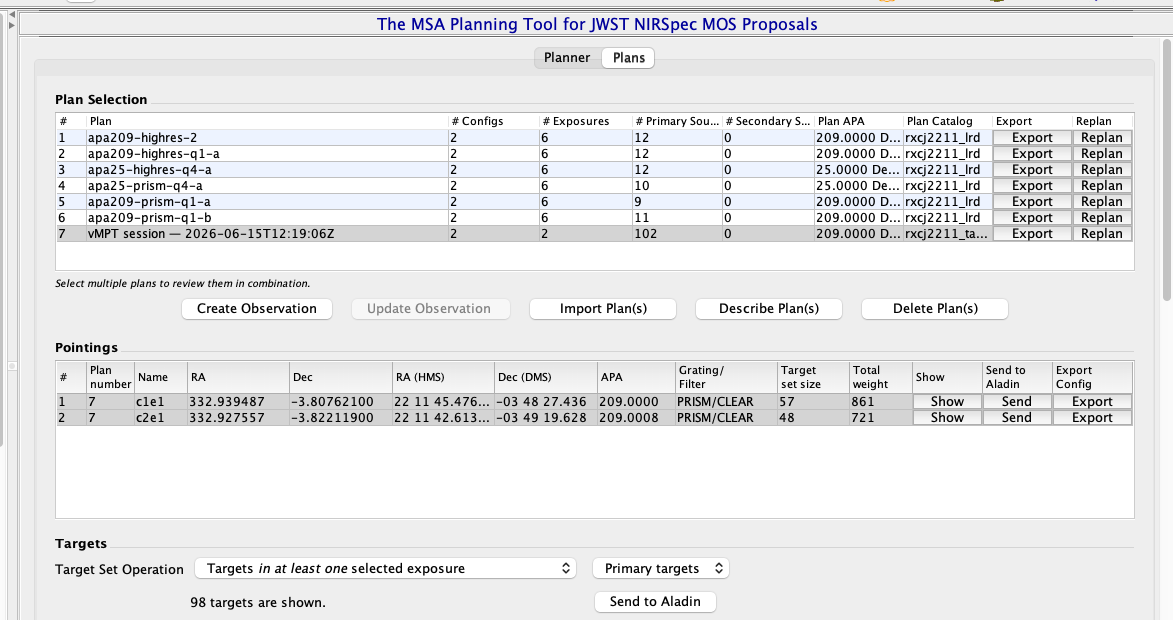
The imported vMPT plan in MPT’s Plans tab — here a 2-config plan shows its two pointings (
c1e1,c2e1) under Pointings (v1.5.0 plans up to five, each its own pointing); use Create / Update Observation to turn it into an APT observation.Finish the design. In the observation set the Nod Pattern column to 3-Shutter Slitlet (vMPT plans 3-shutter slitlets), then set exposure parameters / dithers as your program needs.
Loading into the eMPT pipeline
The three eMPT_* files mirror the format ESA’s eMPT pipeline
expects:
cd /your/empt/checkout/
./step_0_ipa.sh                          # uses eMPT_pointings.txt
./step_1_observed.sh                     # uses eMPT_observed.cat
./step_2_shutters.sh                     # uses eMPT_shutter_mask.csv
Loading back into vMPT
Load session accepts either:
vMPT_workspace.json(full state — picks, slitlet size, snap setting, layer toggles, undo history, custom catalog columns)MPT_plan.json(less complete — picks + pointing only; the siblingvMPT_workspace.jsonis auto-discovered if present)
This is the collaboration loop: pick → save session → share the bundle → collaborator opens it, edits, saves their own bundle → back to you.
Round-trip guarantee
A Save session followed by Load session reproduces the canvas
exactly. The integration tests in tests/test_session_io.py and
tests/test_end_to_end.py pin this round trip.
What lives outside the bundle
These stay on your machine and are not written into the bundle:
The image file (FITS or JPG + WCS sidecar) — too large; vMPT remembers the path.
The original catalog file — vMPT writes its own copy via the
.catexporter; the source CSV/FITS isn’t bundled.Stuck-open shutter mask — comes from CRDS, refreshed every run.
Operability snapshot — same.
So when a collaborator opens your bundle, they need the same
image file at the same path you used. If they’re on a
different machine, they can either symlink to their local copy or
load the image themselves first, then Load session on top of it.